Use an alias as a discreet reminder  0
0
There are a few things you need to know so you can understand my need for this: I am quite forgetful; other people use my Mac quite often; and I have a few Automator workflows (saved as applications) that I run at regular times for various tasks.
I can set iCal to automatically launch the scheduled workflow at the allotted time but can’t guarantee that I won’t be in the middle of something or indeed that my MacBook has its AirPort turned on — it’s always off if I’m running on battery power and don’t need network access.
I could also set iCal to display a reminder to, erm, remind me to run the workflow, but I’ve lost count of the number of times that the carer or someone else has been using my MacBook and, when they’ve finished, a conversation like this has taken place:
Them: “Something appeared on the screen earlier so I clicked ‘cancel’.”
Me: “Oh, what did it say?”
Them: ” … I can’t remember.”
Me: *stab*
So, how can I get iCal to remind me to run a workflow in a discreet and not-easy-to-cancel-and-forget way?
Basically, I wrote a short and simple script to create an alias to the workflow in question and place it on the desktop. The next time I see the desktop I’ll see the alias and can simply double-click it to run the workflow. When it’s done I can drop the alias into the trash. This way there’s no interruption when the reminder time comes around and there’s no pop-up to cancel and forget.
So, open up Script Editor and enter something like:
set workflow to "Small One:Users:tim:Automator:Backup to iDisk.app"

set alias_path to "Small One:Users:tim:Desktop:"

set alias_name to "Backup to iDisk"

set alias_full to (alias_path & alias_name)


tell application "Finder"

  if not (exists file alias_full) then

    make new alias file to file workflow at desktop with properties {name:alias_name}

  end if

  set label index of file alias_name to 2

end tell
The line beginning with set label index ... changes the colour label for the alias’ icon and is entirely optional — change the number for anything from 1 to 7 for orange, red, yellow, blue, purple, green or grey respectively. Replace the names and paths in the first three lines with your equivalents and save it as a script — I named mine Make alias of ‘Backup to iDisk’.
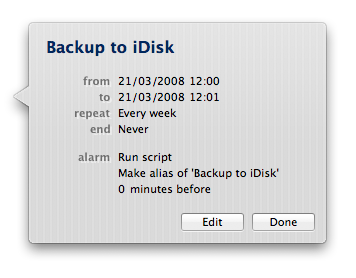
To schedule the running of this script, simply create an iCal event and set the reminder to run your saved script:
And that’s about it. Try it out, change it for your purposes and feel free to offer suggestions for other uses and/or improvements.