Want to shut down a Mac using an Apple Remote? Cheat … like I did - UPDATED  3
3
Sometime ago I was whinging about not being able to shut down my MacBook using my Apple Remote, the short version of which was I wanted to do it using Proxi. Well, after forgetting all about it for ages, a solution finally popped into my head.
Originally I did the following using Proxi’s Timestamp value and an Automator workflow but it proved to be unreliable and inconsistent so I have switched to using good ol’ AppleScript.
In Proxi’s editor drag the Sleep Monitor trigger into the triggers column and set the following options:
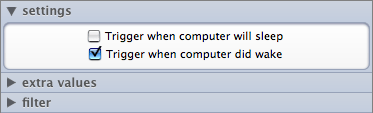
Add an AppleScript task and enter the following script:
tell me to activate

set theDate to current date

if (time of theDate) < 32400 then

  display dialog "Shutting down in 60 seconds unless cancelled ..." buttons {"Cancel", "Shut down"} giving up after 60 default button 1

  copy the result as list to {buttonpressed}

  if the buttonpressed is not "Cancel" then

    tell the application "Finder" to shut down

  end if

end if
Note that from display dialog to default button 1 is a single line, i.e. no breaks.
So, how does it work?
When you (or I) have finished watching/listening/gazing at your Mac and want to shut it down, you put it to sleep by holding down the play/pause button on your Apple Remote for five seconds, wait until it’s properly asleep (my MacBook takes a few seconds to do this) and then press any button on the remote to wake it back up — provided the current time is less seconds after midnight than the figure you set in the AppleScript task (in my example I used 32400, i.e. 9 * 60 * 60, i.e. 9a.m.) the dialog is shown.
tell me to activate makes sure that the dialog box is the frontmost thing onscreen, otherwise there’s a possibility it’ll just hang until it has focus.
The display dialog ... line shows the dialog box with the two buttons, makes Cancel the default button so you can select it by pressing Enter and tells it to give up waiting for a response after 60 seconds.
Finder is then told to shut down unless Cancel was selected.
I am now another step closer in my quest for ultimate laziness.
 Hey Tim, look at all the digg people! - Darren
VERY clever! - Murphy
Sweet! Will be trying this ;) - Digital-Prozac
Comments