Use a Dashboard widget on the desktop  13
13
I can’t remember where I read this but it’s quite a handy trick.
Open up Dashboard and click the “+” to open up the widget gallery:
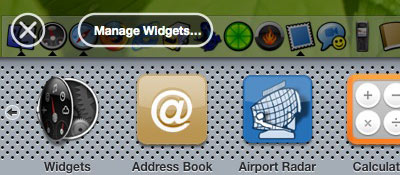
Select the required widget by clicking and holding down the mouse button. Press F12 to close Dashboard and the widget should remain on-screen, still being held by your mouse - simply let go of the mouse button to drop the widget and it will stay on your desktop:
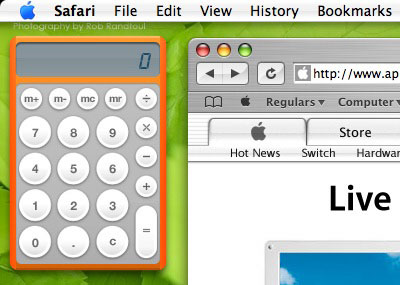
To return the widget, just press F12 - it will re-attach itself to the Dashboard.
The only problem is that I’m not sure if this works in all versions of Mac OS X Tiger - I’m running 10.4.2.
 Hi Timmargh, I like your Mac OS X tiger dashboard but I didn’t try it for two reasons, Sorry!
One reason was I am on a Dell computer and the second reason is that it wouldn’t work properly I don’t think, but it sounds cool anyway!
How are you? - Katie Fraser
Hi Timmargh, I like your Mac OS X tiger dashboard but I didn’t try it for two reasons, Sorry!
One reason was I am on a Dell computer and the second reason is that it wouldn’t work properly I don’t think, but it sounds cool anyway!
How are you? - Katie Fraser
I WANT A MAC. But I bought a guitar instead :-P - SoulSniper
I bet you’ll get more enjoyment out of the guitar than you would’ve a Mac. - Timmargh
It all looks techinical to me, I suppose!
You’re probably like my friend Chris who’s good with computers.
I like your family’s webpages including your niece Stephanie’s webpage.
She certainly sounds like you’re a great uncle to her and she gets on with your missus well. You must be proud of her! - Katie Fraser
I like to *think* I’m good with computers … ;^)
I am proud of my Steph, my niece - she moved to America with her dad just over a year ago and I miss her loads! - Timmargh
Nice trick if you temporarily want a widget on the desktop, too bag pressing F12 stops it - LobsterMan
To be honest, that’s how I thought Dashboard was going to work, so that’s why I was and still am quite displeased with it… - Wayne Smallman
I rarely use it and to be honest I’m a bit annoyed that to use this trick you have to add a new widget - you can’t just grab a widget that’s already open. - Timmargh
If you want to use Dashboard widgets on the desktop all the time use Amnesty:
http://www.mesadynamics.com/amnesty.htm
All your widgets can be selected from a system menu (like old Desk Accessories) and it expands on this little trick: not only are you widgets on the desktop, but you can set the window layer and give a widget opacity, make it auto-update, etc.
Apparently it also runs on Panther.
- ldTruck
Thanks for the comment, IdTruck.
Amnesty looks pretty cool - I especially like the idea of being able to set-up multiple layouts so you can switch to a particular set of widgets and hide the ones you don’t need. I doubt I’ll use it, though, as I barely use Dashboard itself. - Timmargh
Wow… very nice tricks i have found on your website!!!
Keep it up! - Jorge Andres
ugh. i hate how it attatches itself back to dashboard though :@ - Christian
this was very helpful and it made my desktop look a lot better and more useful, but is thier any way to hide the widgets behind othier applications while they are on your desktop ? - john lomax
Comments