This is going to take a while …  5
5
I’ve finally started encoding my DVDs onto my iMac so I can watch stuff in bed with the power of Front Row and AirClick and what better place to start than with my favourite films of the moment: The Lord of the Rings trilogy.
If you know about codecs and other technical stuff relating to video on computers (which I don’t really) then you’ll know that decompressing a H.264 encoded video is fairly CPU intensive. So intensive in fact that my little iMac G4 can only cope with the smallest version of the high definition videos on Apple’s QuickTime movie trailers site.
And what’s even more CPU intensive then decoding a H.264 video? Encoding a H.264 video, i.e. copying it from a DVD to the computer.
This screen shot is of the venerable HandBrake encoding the first half of The Two Towers:
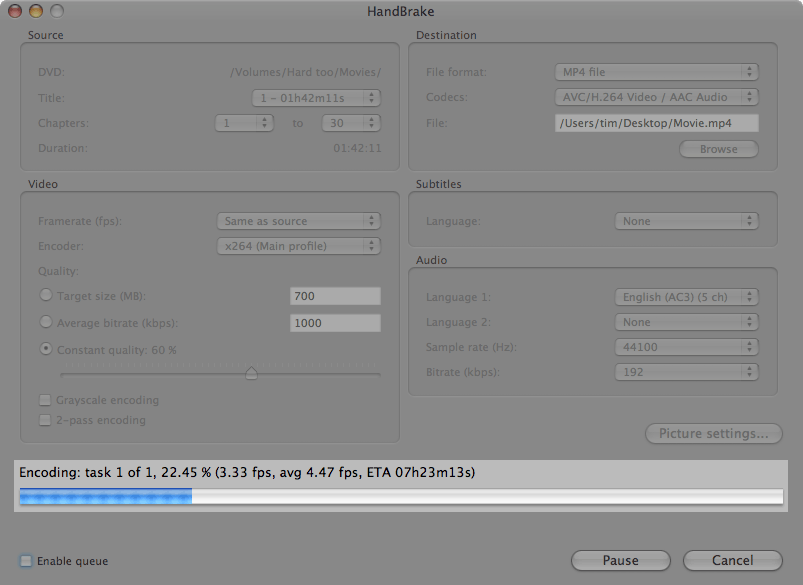
You can see that nearly a quarter has been completed but it still estimates that it has over 7 hours to go and it’s working at an average of 4.5 frames per second.
So, using the settings I’ve selected I can expect any DVD I encode to take at least five times as long as the actual movie itself. Compare this to the Intel iMacs which, according to the HandBrake forums, can achieve at least 40 frames per second. And I won’t even mention the new 3GHz Mac Pro … okay I will: 100+ frames per second!
I know I could choose settings for lower quality and reduce the resolution but I’d like to apply at least just a little bit of future proofing, i.e. I don’t want to have to re-encode when I win the lottery and buy one of the new 24” iMacs (which, incidentally, got me moist when I read about them … ).
Disclaimer
I have no intention whatsoever of copying any of my DVDs. The purpose of encoding them onto my iMac’s hard drive is purely to allow me to watch them from my bed without the need to have loads of DVD cases lying around and to have to get in and out of bed to change the disc.
 Dust off that credit card…
http://www.barefeats.com/imup.html - tugger
Dust off that credit card…
http://www.barefeats.com/imup.html - tugger
That’s not enough … it’s been so long I need extreme speed increases to satisfy my gadget lust! - Timmargh
You can get a big backup HD and back them up full quality. h.264 is crazy, took 17 hours on my iBook, regular mpeg is a bit faster, but still slow. - LobsterMan
You might want to try ripping the DVD first with a program like MacTheRipper. I find Handbrake takes less time encoding it from the hard drive. - HiFoo
Thanks, HiFoo.
I actually started using MacTheRipper right after posting this entry when I read on the HandBrake forums that encoding straight from DVD can send your optical drive to an early grave as it keeps it spinning all through the process. Didn’t speed thing up, though :^( - Timmargh
Comments