Custom CSS Signatures in Mail.app - UPDATED  21
21
After reading Melvin Rivera’s excellent tutorial over at All Forces I set about creating my own HTML/CSS signature in Mail.app and came up with:
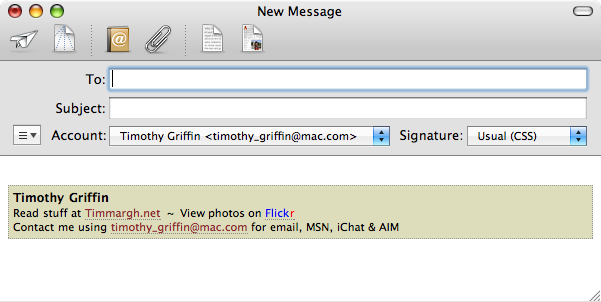
(Melvin shows how to include an image but I’d rather stick to just text.)
I came across a problem, however: when my signature was converted to plain text, for example when someone replied to one of my emails, it looked like:
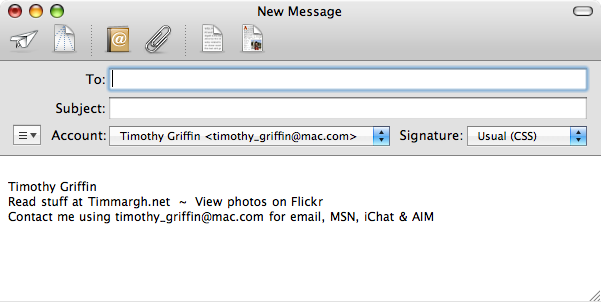
Obviously, the text is now a bit pointless as no hyper-links are present. However, there is a way around this using CSS’s display attribute …
First of all, my site address. As I named the site using part of the address I only need to add a bit of extra code - the original looked like:
Read stuff at <a href="/" style="color: #8f2831; text-decoration: none; border-bottom: 1px #888888 dotted;">Timmargh.me</a>
Which, when viewed as HTML, gives us:
Read stuff at Timmargh.me
… which is how it should be, link and all. However, as plain text it looks like:
Read stuff at Timmargh.me
So, we add some extra code (shown in a different colour) like so:
Read stuff at <span style="display: none">http://</span><a href="/" style="color: #8f2831; text-decoration: none; border-bottom: 1px #888888 dotted;">Timmargh.me</a><span style="display: none">/</span>
(The extra ‘/’ isn’t strictly necessary, but I’m anal about that sort of thing.) This, viewed as HTML, gives us:
Read stuff at Timmargh.me
… which is identical to the original, but as plain text we now get:
Read stuff at http://
It doesn’t look as good, but the URL is there for all to see.
A slightly different approach for the link to my Flickr account. The original code:
View my photos on <a href="http://www.flickr.com/photos/timmargh/" style="color: #0000ff; text-decoration: none; border-bottom: 1px #888888 dotted;">Flick<span style="color: #ff0000">r</span></a>
… viewed as HTML looks like:
View my photos on Flickr
… which, again, is how it should be, but as plain text looks like:
View my photos on Flickr
So, again we add some extra code, this time on the end:
View my photos on <a href="http://www.flickr.com/photos/timmargh/" style="color: #0000ff; text-decoration: none; border-bottom: 1px #888888 dotted;">Flick<span style="color: #ff0000">r</span></a><span style="display: none;"> at http://www.flickr.com/photos/timmargh/</span>
… which, when viewed as HTML, looks like:
View my photos on Flickr
… (identical) but as plain text looks like:
View my photos on Flickr at http://www.flickr.com/photos/timmargh/
And … that’s it. Not particularly clever or neat, but it puts my mind at rest.
Update #1
The entire code for my signature as requested by David, although I’ve coloured and split it onto several lines for easier reading - be sure to remove any line-breaks and spaces from the beginning of lines:
<div id="sig" style="line-height: 14px; margin: 8px 0; padding: 4px; background-color: #ddddbb; border: 1px #999999 dotted; font-family: 'Lucida Grande', Verdana, Arial, Sans-Serif; font-size: 11px; color: #000000;">

  <strong style="line-height: 16px; font-size: 12px; padding-top: 8px;">Timothy Griffin</strong>

  <br />Read stuff at <span style="display: none">http://</span><a href="/" style="color: #8f2831; text-decoration: none; border-bottom: 1px #888888 dotted;">Timmargh.me</a><span style="display: none">/</span>

  <br />View my photos on <a href="http://www.flickr.com/photos/timmargh/" style="color: #0000ff; text-decoration: none; border-bottom: 1px #888888 dotted;">Flick<span style="color: #ff0000">r</span></a><span style="display: none;"> at http://www.flickr.com/photos/timmargh/</span>

  <br />Contact me using <a href="mailto:emailaddress@mac.com" style="color: #8f2831; text-decoration: none; border-bottom: 1px #888888 dotted;">emailaddress@mac.com</a> for email, MSN, iChat & AIM

</div>
Update #2
As Ryan pointed out, below, using this method doesn’t always give us the results we want. He suggests an alternative method: format the “hidden” text as white (or the same colour as your background) and in a very small font size. So, using my Flickr link as an example, we’d put:
View my photos on <a href="http://www.flickr.com/photos/timmargh/" style="color: #0000ff; text-decoration: none; border-bottom: 1px #888888 dotted;">Flick<span style="color: #ff0000">r</span></a><span style="color: #ddddbb; font-size: 0.1px;"> at http://www.flickr.com/photos/timmargh/</span>
… which looks like:
View my photos on Flickr at http://www.flickr.com/photos/timmargh/
The hidden text is just about visible (if you look very closely), but in the context of my signature, i.e. with the properly coloured background, it will be invisible.
The only downside of this method is that you can’t really hide long strings mid-way through a line of text as you’d see a gap; e.g. the code:
This text is visible and can always be seen. <span style="color: #ffffff; font-size: 0.1px;">This text is hidden and can only be seen as plain text. </span>This text is also visible and can always be seen.
… looks like:
This text is visible and can always be seen. This text is hidden and can only be seen as plain text. This text is also visible and can always be seen.
It my look different in your browser, but in mine (Safari) it looks like this:

So, if you want to use this technique you’ll have to come to a comprise on the layout and content of your signature. Personally, I think I do actually prefer Ryan’s technique and I’ll be adjusting my signature to fit it in.
 brilliant solution timothy! - Melvin rivera
Cool trick, I gotta try it…
BTW, I like the new header image. - LobsterMan
Thanks Melvin, LobsterMan.
The header image is from Digital Blasphemy and I’m working on a choice of colour schemes to match some different images. - Timmargh
Oh Timmy and Melvin, you’re my heroes! I will now have a sig in my emails!!! - MHC
Just one thing… I need to specify a background colour and uhm… How do I phrase this particular property? A body tag? - MHC
Nope doesn’t work… - MHC
The whole sig doesn’t work or just the background colour? I don’t think you can colour the entire message, just the signature. - Timmargh
The background colour… Sig works great! At least it looks fine in a Safari page! I am trying to add a background colour in the sig and I just can’t see how to. - MHC
Have you wrapped the sig in a <div> ? At the start of mine I have something like:
<div id="sig" style="background-color: #ddddbb; … "> …
And obviously at the end there’s a </div> - Timmargh
I tried that! IT WORKS!!!!! WHOOH HOOH! Thanks a billion, Timmy!!! Expect an email! ;^) - MHC
Oh and I love the new design in here! Bravo, Timmy!!!
*Clap* - MHC
Thanks MHC - I’m working on a choice of seasonal colours schemes at the moment … - Timmargh
After MHC pointed me in the direction of this post i think i’ve got it working. I’ve also bombarded her with a ton of emails today consisting of “does it look ok to you” and “why doesn’t that work if i reply” oh and “the sig text changes colour if you have colour quoted text switched on”
So, i may have to start sending emails to you instead
As for the design - it’s very nice in here, and digital blasphemy is an awesome source of images. I need to redownload all those 3d rendered islands and mountains i used to have at work for my desktop instead of the boring blue background (though tbh i rarely see my desktop so there isn’t a lot of point!) - stonysleep
"So, i may have to start sending emails to you instead"
Please feel free … can’t guarantee I’ll be able to help though! - Timmargh
This is a great idea, but I’m running into a problem. It seems Mail.app does not include the “hidden” text in the plain-text version of the message.
What I’m trying to do is put a “—” at the top of the signature to make sure that it’s differentiated from the body of the email. The “—” is not necessary if the HTML version is viewed (since I have a CSS border acting as the dividing line) but I want it to show up if the plain-text version is viewed.
The only thing I can think of is to use white-colored text instead of the “display: none;” tag. - Ryan
Yeah, it seems to depend on the other users mail program - I’ve had some replies where the hidden text shows and some where it doesn’t.
White coloured text is good idea - I might try that. - Timmargh
I know it is a waste of bits but I love this stuff. Could you post the code for you entire sig…modifying code is the only gear I have right now. Cheers! - David
David: I’ve added the code at the end of the article. - Timmargh
Okay, I finally got the “—” to consistently show up in the plain text version of my signature by adding a line at the top of my HTML (before the main DIV tag) that looks like this (except with the correct type of bracket):
{span style=”color: #FFFFFF; font-size: 0.1px;”}—{/span}{br /}
I originally had the font size set at 0px, and it works beautifully in Firefox, but it causes Safari to balk and display the “—” at full size. - Ryan
Nice one - I’ll make a note of that. - Timmargh
Thanks. I am digging it. - David
Comments