Put your Mac to sleep by sending a text message  60
60
Do you ever go out shopping, to the pub or to the beauty clinic for your fortnightly waxing session and forget to put your Mac to sleep? I know I do, so I thought of a way to do it by sending a text message from my mobile/cell phone - well, technically we’re not going to be sending a text (SMS) message, rather a multimedia (MMS) message.
I have my mobile phone contract with Vodafone and I can send an MMS message to an email address instead of a phone number and Vodafone converts the message to an email. If you’re unable to do this then I’m afraid you might as well stop reading here … :^(
For those of you still reading, you need to send an MMS message to your own email address and make a note of the email address it comes from - the ones I send from my phone are in the form 44xxxxxxxxxx@mms.vodafone.co.uk with the “xxxxxxxxxx” being replaced with my actual mobile phone number.
Now you need to download mac-help.com’s Sleep Automator action.
Next, open Automator and create a workflow by dragging the Pause action from the Automator library followed by the newly added Sleep from the System library:
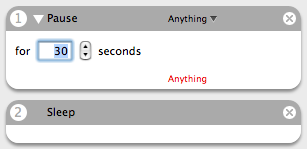
(You’ll see why I’ve added the pause later on.)
Save this workflow as an application - I named mine “Mister Sandman” because I think I’m clever …
Now we need to write a small piece of AppleScript to launch this application, so launch Script Editor and enter the following command:
tell application "Mister Sandman" to run
Obviously you should replace “Mister Sandman” with the name you gave the workflow above. Save this script - I called mine “Launch Mister Sandman”
Open Mail, go to Mail -> Preferences -> Rules and select Add Rule. Fill in the conditions and commands as shown in this screenshot:
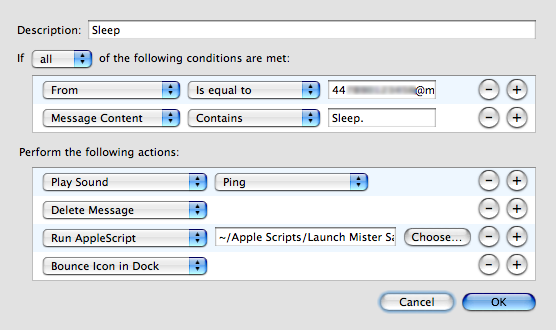
Obviously you can change Description to anything you like and you need to enter the email address you made a note of earlier in the From -> Is equal to field, select the AppleScript you saved in the Run AppleScript field and decide what word(s) you’d like to activate the process in the Message Content -> Contains field. Save the rule and you’re done.
I added Play Sound1 and Bounce Icon in Dock to the rule so that if someone else happens to be using my iMac when a ‘sleep’ email comes in then at least they know about it and have 30 seconds to cancel the workflow - that’s why I added the pause earlier on.
The success of this process relies on you having your Mac set to automatically check for emails periodically - if yours is set like this then, erm, good.
Update
As people have said in their comments you can use this procedure to get your Mac to do just about anything. For those of you who have questioned why I’ve set it up on my iMac: I’m a crip and if I’m in bed, for instance, it’s easier for me to send a text message than to spend the 20 minutes it takes me to get out of and then back into bed.
Notes
- When I selected Play Sound it showed Move Message but still allowed me to select a sound - this appears to be a visual bug in Mail itself. I edited the screenshot so as not to cause confusion incase your installation didn’t display the same bug.
 I WANT A MAC! - SoulSniper
Christ on a bike - you posted that quick! - Timmargh
Awsome! keep them coming…! - tugger
Excellent, is their any chance you know of a similar piece of software that works for a PC? - OvertoneBliss
I don’t of anything off the top of my head, but I’m sure there will be add-ons for Thunderbird or Outlook Express to execute commands based on rules.
If I see anything I’ll let you know. - Timmargh
with email spoofing being so easy, I’d imagine that this applescript could be a big security risk. Sure, its rather harmless putting the computer to sleep, but the annoyance factor of your box zonking out at random is a bit more troubling. Novel idea though, just don’t know how practicle. :) - J$
Whats your e-mail address??? 8p - Anonymous
Overtonebliss, yes there is software that can do this on a PC. Its called OSX86!
- Jeff
It isn’t much of a security risk for the Mac. It gives you thirty seconds to abort it, and should someone figure out the message you send (it doesn’t have to be sleep), you can just change it.
I’m not sure who would even bother trying to spoof your email to put your system to sleep. Well, unless they wear a special person helmet, that is. ;-) - WTL
Do you know of any applications (or widgets, preferably) that allow me to send a message to a UK mobile phone from my Mac? I currently only can find a US/Canada version.
Thanks. - Scott
For a Windows machine, you could probably create a VBscript to put the PC to sleep. I’m not sure whether you can create rules in Outlook (I don’t use it!). I use Lotus Notes - you can create rules in it, but not ones that control resources that are external to the app.
I wish I had Mac and OSX.
Microshaft sucks. - Barkie
J$: as WTL said I can just change the words needed to put my machine to sleep should anyone discover how to spoof my address. And on that point: I don’t go around handing out my mobile number while at the same time telling them that my Mac is set-up this way …
Thanks for commenting, though. - Timmargh
Great! I’ll try it on my Mac at home! Thanks for the tip! - Michael
In outlook 2003 you can create rules and have a script run. Not quite sure how to do it since I only use outlook at work and don’t have all the rights I believe I need. - Geisrud
Cool Idea.
To make it work before Tiger, just make it all applescript. So instead of doing tell application “Mister Sandman” to run you can do tell application “finder” to sleep - Tarous Zars
Any box that runs Outlook (03?) can do this. If you can shutdown a computer normaly, you can do it with outlook. Just set up a rule to run %systemroot%\system32\shutdown.exe then enter you favorite command-line arg. done. - Anonymous
Nice one, Tarous. Trouble is that you don’t get the chance to cancel it if you’re using the computer at the time. - Timmargh
Wow! Great! And you could probably do this to automate other things on your computer as well. Heck, even shut down, no? - Matt
Yes, you can do this with a PC. You’d have to write your own SMTP receiver that could run on your machine in the background, watching all the incoming email addresses, before they got to your mail client. You could do that with the plain-old GCC port for x86.
Then, you could hand off the content from anything received, to a PERL script, that could either do the work itself, or could invoke the GNU port for windows, which includes a shutdown command-line tool.
Of course, all of that would require the average user to have programming skills, and knowledge of the platform, so I guess the answer ultimately, is no.
- Greg Gauthier
Not so. You can get a chance to cancel. Just use a display dialog with a timeout statement. - Peter
Outlook 2003 can run an application based on a recieve rule, if i wanted to do this I’d combine it with a batch file running psshutdown ( http://www.sysinternals.com/Utilities/PsTools.html )
something like:
“c:\pstools\psshutdown -f -c -k -t 60” which is power off (-k) delay 60 seconds (-t 60) allow user to abort (-c) force applications to shutdown (-f).
BDC - BDC
Nice. Now, how do you wake up a Mac remotely? - Anonymous
This is a brilliant little idea, obviously the implications are fantastic - why limit it to putting your mac to sleep? - anonymous
But what about security? You don’t want just anyone putting your mac to sleep; much less any of the other useful things one could do with this concept… - Anonymous
I own and love the mac! Having said that the funniest part about this post is how many mac users assume that this is such a great example of stuff the mac can do better. This is just as easy or easier to do on a pc. No need to use scripting etc. Just build a rule in your favorite email program to execute the shutdown command with the sleep option. - Steve
As many of you say: it’s not limited to putting your Mac to sleep - that’s simply the first thing I wanted to set-up.
As far as security goes: how can someone discover the trigger words you’ve set-up unless they can physically get to your Mac? - Timmargh
Very good hack. Pretty easy to create, but I never though of doing this. - Berislav
Uhm, why don’t you just remember to turn your Mac off before you leave? I don’t turn my Mac off ever actually… - Aaron The Young
Yeah, it’d be easy to write something like this for Windows, in Visual Basic/RealBasic… - Robin Card
Yeah, you can do this on various flavors of Windows with Outlook and other clients. But do they lend themselves to this kind of amateur automatization? - Pipo
alert(“Mac - the best OS for idiots!”);
- Anonymous
Well, thanks you two. Did you read the site’s subtitle?
Either way, you can both fuck off. - Timmargh
I am going to install this on my coworker’s macs as an April Fools joke, but maybe start playing with it earlier than April.
Thanks! - H. N. Teft
:^D - Timmargh
Yo Timmargh,
Very good thinking there, outside the box and stuff. Steve Hawkings better watch his back! (he looks like he’s always watching his back anyway with that twisted torso)
- monkey_man
Haha - you sicko. - Timmargh
Very cool. I suppose there’s no way to do the reverse, to have the Mac wake based on an email? Thanks. - Anonymous
That’s not possible unless Mail can check for new emails whilst the Mac is asleep … which it can’t.
I used to have a second landline purely for faxing to and from my Mac. I had the Mac set to wake up on an incoming call so I could just ring the fax line to wake my Mac - never actually used it though. - Timmargh
Cool!!! though I can care less if my mac is sleeping, and actually like it to be awake if it’s plugged in. but the idea is great for other remote actions, i’ll be sure to dig deeper into the idea. Thanks! - LobsterMan
A few comments:
1) Greg, that is not an SMTP receiver, the protocol is either IMAP or POP. Also, is not even a receiver, as the transactions are started from the client and not pushed from the server. Perhaps a sniffer, not an easy task though.
2) Timmargh, have you checked that the 44***@mms… address does not correspond to a real address? That poor man would otherwise receive lots of virus and spam on his email!
3) your idea is quite safe as you have three unknown variables, the sender, the receiver and the command.
4) it is “its content”, not “it’s content”. Now I am content… - Giuliano
Well done, Giuliano, you spotted my, erm, deliberate mistake.
;^) - Timmargh
Great idea! I set mine up to launch a few applications so they are ready when I get home. - Brad
..could you arrange to change the trigger text via text message..?? :-) - tugger
Hey, im trying to find the automator tool on mac-help but im having a helluva time. Will you e-mail me a direct link? Thanks. - Brad
Nvm i got it, thanks aneways mate - Brad
Righto.. - Timmargh
I can do that cheaper. When my landline phone rings and the caller gets throught to voice mail, my ISP then sends me an email with the audio message as attachement, and of course the caller’s number…
- Laurent
SPAM ALERT!!!!!! - MHC
Spam? What spam?
*ahem* - Timmargh
ROTFL
:^D - MHC
Why not just set the computer to go to sleep after a period of inactivity? Easily done in the energy saver system preference! My computer atomaticaly sleeps after 30 mins. - Alan
You can do that but I sometimes leave my iMac downloading something big or doing some other job and I don’t want it going to sleep halfway through.
Plus, being disabled, the more things I can do remotely the better. - Timmargh
for those interested in waking the machine: look up “wakeonlan” (network sys prefs has a checkbox).
Basically you need to get an awake machine on the SAME local network to send a special signal to your machine, and that’s it! - ts
First off thanks for the awesome tips on your site! When I put a folder onto the dock I can drag files directly to it, however I cannot drag “internet location files” (icon from the address bar) into there folders. I have to first open it up then drag and drop. Is there a way to fix that
Thanks - Mikewake
" … When I put a folder onto the dock I can drag files directly to it, however I cannot drag “internet location files” (icon from the address bar) into there folders. I have to first open it up then drag and drop … "
You’re talking about the Get your morning news with Automator entry? I’ve had that trouble, too, but haven’t found a solution yet other than dropping it onto the desktop first and then dragging it to the folder in the dock. - Timmargh
I just applied this to my Mail, along side the Act-On bundle. And I can’t get this rule to work. Nothing happens when I send an appropriate email. I tested the script and the Automator application separately.
When I right-click the email message and I choose “Apply Rules”, the Act-On bundle kicks in.
Any tips?
- Benito - Benito
Benito: I’ve had a play with some settings but couldn’t get it to do what you’re describing. I couldn’t find any fixes online, either. Sorry! - Timmargh
Hello!
Nice site ;)
Bye - huladiday
This is sweet, i dont use mail on my mac though. is there a way to do it using gmail - chris
I don’t use Gmail, Chris, so I’ve no idea I’m afraid. - Timmargh
Comments