photo Drop  1
1
photo Drop is one of those applications that you look at, use and then begin wondering how you ever managed without it. It’s one hell of a handy little gadget.
When you open the program, you are presented with a clean, uncluttered and incredibly straight forward interface:
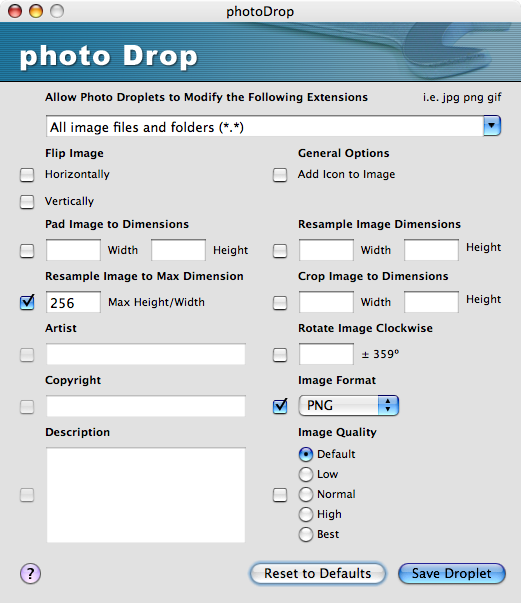
You select the options you want and fill in the necessary values - in the image above I’ve selected to convert my images to PNG format and to resize them so the height or width is a maximum of 256 pixels.  When you click the Save Droplet button you’re presented with a standard “save” dialog - enter a filename and a “droplet” is created.
This droplet can be placed anywhere and any image file in a supported format that is dropped onto it will be converted using the options you selected.
And the best news about this super-useful gem? It’s free. I’m sure the author would be grateful if you bunged him a few dollars if you find it useful - I did … *polishes halo*
 I downloaded that Wednesday but have yet to use it! I’ve heard rave stuff on it and that’s why I downloaded it. :^D
When I start using it if I want extra nifty cool advice or tricks I know on which door to knock! ;^) - MHC
I downloaded that Wednesday but have yet to use it! I’ve heard rave stuff on it and that’s why I downloaded it. :^D
When I start using it if I want extra nifty cool advice or tricks I know on which door to knock! ;^) - MHC
Comments