BurnoutMenu 2.0  4
4
I am forever thinking of things I need to do before a certain time or date and then completely forgetting to do so. I’ve always needed to create a list of things that need doing to keep myself on track and after reading many of the comments on ‘What’s in your menubar?’ in the hicksdesign journal I found what seems to be the ideal app for me: BurnoutMenu.
I’m using this tasty little gem as a trial at the moment, but I’ve no doubt I’ll be paying for registration soon.
At a basic level this is a to-do list that sits in your OS X menubar, but it has much more functionality:
iPod Compatibility: Use your iPod as a virtual to-do list, grocery list, or anything else you can imagine.
iCal Compatibility:BurnoutMenu seamlessly integrates with Apple’s iCal and synchronizes in real time. iCal Sync code has been rewritten completely and is a lot more powerful.
iDisk Compatibility:Need to see what needs to be done somewhere else? View and manage your tasks from any Mac!
Priorities: Organize and customize them. You can even change the color and name of each task status.
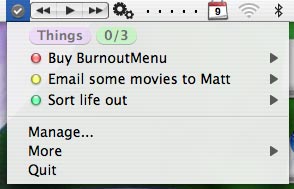
There are many more features, but you can get the full low-down from the product website.
I’ve abandoned this and gone for MenuCalendarClock instead.
 I do like the look of BurnoutMenu.
Though I must confess, it does look to have the ability of making things a little more complicated than they need be… - Wayne Smallman
I do like the look of BurnoutMenu.
Though I must confess, it does look to have the ability of making things a little more complicated than they need be… - Wayne Smallman
It does have a few features that I’ll probably never use, but just having it within easy reach has improved things drastically after only two days.
Now, if I could find an app that I could enter my to-do’s into and then it would do them for me … - Timmargh
And by piling so much functionality through the a menu, I’d say they’re not being too observant of the Human Interface Guidelines… - Wayne Smallman
the website to download the burnoutmenu2.0 is down…
dr. motte - dr. motte
Comments